Introduction
A reliable point of sale (POS) system is no longer a luxury for small businesses—it has become an essential tool for managing daily operations, processing sales, tracking inventory, and understanding customer behavior. However, many startups, independent retailers, cafés, and restaurants operate with limited budgets and may not be ready to invest in expensive POS software.
This is where Loyverse POS has gained significant popularity. Known for its free core POS software and user-friendly interface, Loyverse offers businesses an affordable way to modernize their operations without requiring a large upfront investment. Despite being free to use for its basic POS functionality, the platform includes features that can help businesses improve efficiency, manage inventory, and build stronger customer relationships.
In this comprehensive review, we’ll examine Loyverse POS’s features, pricing, strengths, weaknesses, and whether it remains one of the best free POS solutions for cafés, restaurants, and retail shops in 2026.
What Is Loyverse POS?
Loyverse POS is a cloud-based point of sale system designed primarily for small businesses. It supports a wide range of industries, including retail stores, cafés, restaurants, bakeries, food trucks, salons, and service businesses.
The platform enables businesses to manage:
- Sales transactions
- Inventory
- Customer information
- Employee management
- Sales reports
- Loyalty programs
- Multiple store locations
Because it is cloud-based, business owners can access business data from virtually anywhere using a smartphone, tablet, or computer with an internet connection.
One of Loyverse’s biggest advantages is that the core POS application is available free of charge, making it particularly attractive for startups and independent business owners.
Key Features
1. Free POS Software
The biggest reason many businesses choose Loyverse is its free POS application.
The core software allows users to:
- Process customer transactions
- Create product catalogs
- Apply discounts
- Print or email receipts
- Manage taxes
- Process refunds
- Accept multiple payment methods (depending on the payment provider)
This makes Loyverse an accessible option for businesses seeking to reduce software expenses.
2. Inventory Management
Loyverse offers built-in inventory management designed to simplify stock control.
Businesses can:
- Track inventory levels
- Add new products
- Organize product categories
- Receive low-stock notifications
- Monitor stock movement
- Manage product variants
Although its inventory tools may not be as advanced as those found in enterprise retail systems, they are more than sufficient for many small businesses.
3. Customer Loyalty Program
Customer retention is essential for long-term business growth.
Loyverse includes a built-in loyalty program that enables businesses to:
- Create customer profiles
- Track purchase history
- Reward repeat customers
- Monitor customer spending
- Encourage repeat visits
This feature helps businesses strengthen customer relationships without requiring separate loyalty software.
4. Employee Management
Loyverse includes employee management tools that help business owners oversee staff performance.
Users can:
- Create employee accounts
- Assign access permissions
- Track employee sales
- Monitor work shifts
- Review employee performance
These tools improve accountability while simplifying daily management.
5. Sales Reporting
Business owners need accurate data to make informed decisions.
Loyverse provides reports covering:
- Daily sales
- Weekly revenue
- Monthly performance
- Best-selling products
- Inventory status
- Employee sales
- Customer purchasing behavior
Reports are available through the cloud dashboard, allowing managers to monitor business performance remotely.
6. Multi-Store Management
Businesses operating multiple locations can manage them from a centralized system.
Multi-store features include:
- Shared inventory
- Store-specific reports
- Centralized product management
- Inventory transfers
- Employee management across locations
These tools help simplify operations for growing businesses.
7. Offline Mode
One practical advantage of Loyverse POS is its ability to continue processing sales during temporary internet outages.
When connectivity is restored, transaction data is synchronized with the cloud.
This feature helps reduce disruptions during busy business hours.
Ease of Use
Loyverse is designed to be beginner-friendly.
The interface is clean, modern, and easy to navigate.
Employees can quickly learn how to:
- Process transactions
- Search products
- Apply discounts
- Issue refunds
- Check inventory
- View customer information
Minimal training is generally required before staff become comfortable using the system.
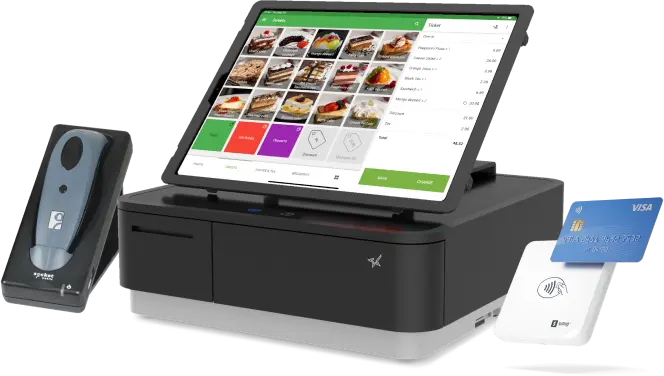
Hardware Compatibility
Loyverse supports a variety of compatible hardware, including:
- Tablets
- Smartphones
- Receipt printers
- Barcode scanners
- Cash drawers
- Customer displays
- Card readers (depending on supported payment providers)
Businesses can build a POS setup that matches both their budget and operational requirements.
Integrations
Loyverse integrates with several third-party business services, including:
- Payment processors
- Accounting software
- E-commerce solutions
- Business management applications
- Marketing tools
Although its integration ecosystem is smaller than some enterprise POS platforms, it continues to expand and supports many common business needs.
Security
Protecting customer and business data is an important part of any POS system.
Loyverse includes several security features:
- Secure cloud storage
- Data encryption
- User permission management
- Automatic synchronization
- Secure login controls
- Regular software updates
These features help businesses protect sensitive operational information.
Pricing
Loyverse follows a flexible pricing model.
The core POS software is available free of charge.
Optional paid add-ons include advanced features such as:
- Employee management enhancements
- Advanced inventory capabilities
- Additional business management tools
This allows businesses to start with the free version and upgrade only when additional functionality is needed.
Pros
Loyverse POS offers numerous benefits:
- Free core POS software
- User-friendly interface
- Built-in customer loyalty program
- Reliable inventory management
- Cloud-based accessibility
- Multi-store support
- Offline transaction capability
- Mobile-friendly operation
- Suitable for multiple industries
- Affordable upgrade options
Cons
Despite its strengths, Loyverse has some limitations:
- Advanced reporting and inventory features require paid add-ons.
- Large enterprises with highly complex operational requirements may require more advanced POS platforms.
- Hardware compatibility may vary depending on region and payment provider.
- Some third-party integrations are more limited than those offered by enterprise systems.
These considerations are typical for entry-level and small business POS solutions.
Best Businesses for Loyverse POS
Loyverse is particularly well suited for:
- Cafés
- Coffee shops
- Restaurants
- Bakeries
- Food trucks
- Retail stores
- Convenience stores
- Gift shops
- Beauty salons
- Barbershops
- Boutique retailers
- Small independent businesses
Businesses looking for a low-cost or free POS system are likely to benefit the most from Loyverse.
Customer Support
Loyverse offers several support resources.
Available support options include:
- Help Center
- Knowledge base
- Community resources
- Email support
- Product documentation
- Video tutorials
- User guides
These educational materials help businesses implement and manage the platform effectively.
Is Loyverse POS Worth It in 2026?
Loyverse POS continues to be one of the best free point of sale solutions available for small businesses in 2026.
Its combination of sales processing, inventory management, customer loyalty, employee tracking, and cloud accessibility provides exceptional value—especially considering that the core POS software is free.
While larger retailers and restaurant chains may eventually require more advanced enterprise POS systems, startups and growing independent businesses will likely find Loyverse offers an excellent balance of affordability, simplicity, and functionality.
Loyverse POS vs. Other Free POS Systems
Compared with other entry-level POS solutions, Loyverse competes well by offering a generous set of features without requiring an upfront software subscription.
Square POS is known for its seamless payment processing and simple onboarding, while Shopify POS is ideal for merchants combining physical stores with online sales. EPOS Now and Lightspeed provide more advanced inventory and reporting capabilities for businesses willing to invest in premium solutions.
Loyverse distinguishes itself by focusing on affordability, ease of use, and a built-in customer loyalty program. This makes it particularly attractive for independent retailers, cafés, and restaurants that want professional POS functionality while keeping operating costs under control.
Final Verdict
Overall Rating: 4.8/5
Pros
- Free core POS software
- Simple and intuitive interface
- Built-in customer loyalty program
- Reliable inventory management
- Cloud-based access
- Multi-store support
- Offline sales capability
- Affordable upgrade options
- Excellent for startups and small businesses
Cons
- Advanced features require optional paid add-ons
- Limited enterprise-level functionality
- Some integrations depend on region and payment providers
- Large businesses may eventually outgrow the platform
Conclusion
Loyverse POS remains one of the most attractive free point of sale solutions for cafés, restaurants, and retail shops in 2026. Its cloud-based architecture, easy-to-use interface, built-in loyalty program, and reliable inventory management provide small businesses with the essential tools needed to manage daily operations efficiently. For entrepreneurs seeking a professional POS system without significant software costs, Loyverse continues to be an excellent option that can support business growth while remaining budget-friendly.