Introduction
Choosing the right point of sale (POS) system is one of the most important decisions for any business. A reliable POS platform does much more than process payments—it can help manage inventory, monitor employee performance, build customer relationships, generate business reports, and even support online sales.
Among the many POS solutions available today, Clover POS has established itself as a popular choice for retailers, restaurants, cafés, service providers, and other small to medium-sized businesses. Its combination of modern hardware, cloud-based software, and a growing marketplace of business applications makes it a flexible solution for companies with varying operational needs.
But with strong competition from Square, Shopify POS, Lightspeed, and Toast, is Clover POS still worth considering in 2026?
In this comprehensive review, we’ll explore Clover POS’s features, pricing, advantages, disadvantages, and determine whether it remains a smart investment for modern businesses.
What Is Clover POS?
Clover POS is a cloud-based point of sale system that combines payment processing with business management tools. The platform is designed to help businesses handle day-to-day operations from one centralized dashboard.
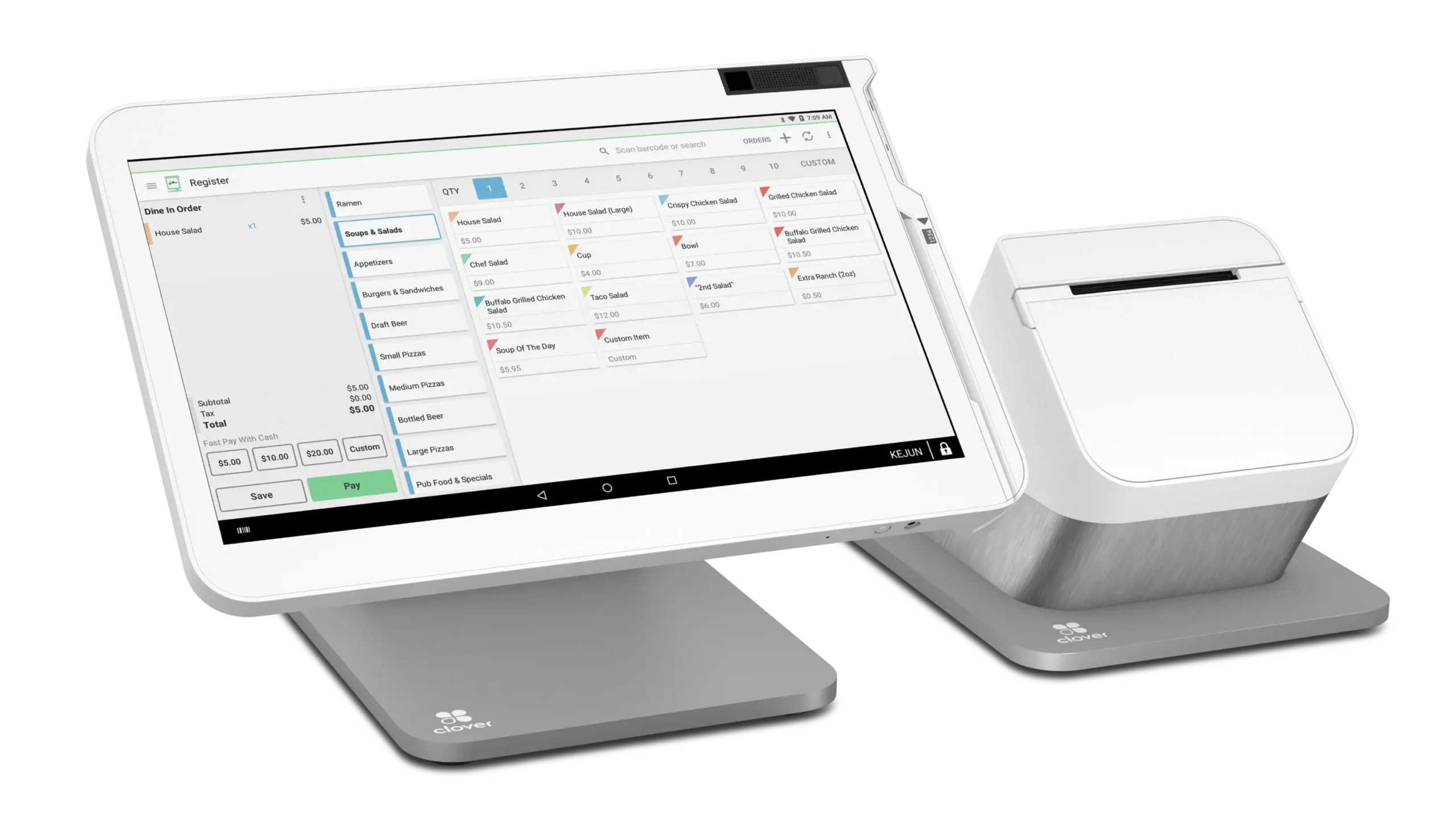
Clover offers several hardware options, allowing businesses to choose a setup that matches their workflow, whether they operate from a retail store, restaurant, food truck, salon, or mobile business.
Because it is cloud-based, business owners can monitor sales, inventory, employees, and reports from virtually anywhere using an internet connection.
Key Features
1. Fast Payment Processing
Clover supports a wide variety of payment methods, making checkout convenient for customers.
Supported payment options include:
- Credit cards
- Debit cards
- Contactless payments
- Mobile wallets
- Gift cards
- Chip cards
- Digital payment methods (where available)
Fast transaction speeds help reduce customer waiting times while improving the overall checkout experience.
2. Inventory Management
Clover includes inventory tools that help businesses stay organized.
Users can:
- Add unlimited products
- Organize products into categories
- Track inventory levels
- Receive stock alerts
- Monitor product sales
- Manage product variants
- Generate inventory reports
For small and medium-sized retailers, these features simplify inventory management without requiring separate software.
3. Employee Management
Managing staff efficiently is essential for growing businesses.
Clover provides employee management tools that allow owners to:
- Create employee accounts
- Assign permission levels
- Track employee sales
- Monitor working hours
- Review staff performance
- Restrict access to sensitive functions
These features help improve accountability while protecting business information.
4. Customer Management
Building customer loyalty can increase long-term revenue.
Clover helps businesses create customer profiles by storing:
- Contact information
- Purchase history
- Visit frequency
- Customer preferences
Businesses can also use compatible applications to launch loyalty programs, promotional campaigns, and personalized marketing efforts.
5. Reporting and Analytics
Business insights are available through Clover’s built-in reporting dashboard.
Available reports include:
- Daily sales
- Monthly revenue
- Product performance
- Sales by employee
- Payment method analysis
- Tax summaries
- Inventory reports
- Refund history
These reports help business owners identify trends and make informed operational decisions.
6. App Marketplace
One of Clover’s biggest strengths is its App Market.
Businesses can install applications for:
- Accounting
- Employee scheduling
- Online ordering
- Customer loyalty
- Appointment booking
- Delivery services
- Marketing automation
- Payroll
- Inventory enhancements
This flexibility allows businesses to expand functionality without replacing the entire POS system.
Ease of Use
Clover is known for its clean and intuitive interface.
Employees typically require minimal training to learn how to:
- Process sales
- Accept payments
- Issue refunds
- Manage products
- View reports
The touchscreen interface is responsive and designed for fast daily operation, making it suitable even for businesses with high customer traffic.
Hardware Options
Clover offers several hardware configurations depending on business requirements.
Popular devices include:
- Clover Flex
- Clover Mini
- Clover Station
- Clover Station Duo
- Clover Go
This range allows businesses to choose portable or countertop solutions based on their workflow.
Cloud-Based Management
Since Clover stores data in the cloud, owners can remotely access important business information.
This includes:
- Sales reports
- Inventory updates
- Employee activity
- Customer data
- Business performance
Remote management is especially useful for owners operating multiple locations or frequently working away from their stores.
Pricing
Clover’s pricing varies depending on:
- Hardware selection
- Software plan
- Payment processing provider
- Business type
- Additional applications
While the initial investment may be higher than some entry-level POS systems, businesses gain access to professional hardware and scalable software that can grow alongside their operations.
Potential buyers should also consider transaction fees and any optional subscription services when calculating total ownership costs.
Security
Security is a key priority for payment processing systems.
Clover includes several protective features, including:
- PCI-compliant payment processing
- Data encryption
- Secure cloud storage
- User permission controls
- Automatic software updates
- Fraud prevention measures
These features help safeguard both customer payment information and business records.
Integrations
Clover integrates with numerous third-party business tools.
Popular integration categories include:
- Accounting software
- Inventory management
- Payroll services
- E-commerce platforms
- Customer loyalty systems
- Marketing applications
- Scheduling software
- Delivery services
This flexibility allows businesses to build a technology ecosystem that fits their unique operational needs.
Pros
Clover POS offers several significant advantages:
- Modern and professional hardware
- User-friendly interface
- Flexible hardware options
- Strong payment processing capabilities
- Good inventory management
- Extensive App Market
- Cloud-based remote access
- Comprehensive reporting
- Suitable for many business types
- Scalable as businesses grow
Cons
Like any software solution, Clover has some limitations.
Potential drawbacks include:
- Pricing varies depending on provider and hardware package.
- Some advanced features require paid applications.
- Monthly costs may increase as additional services are added.
- Businesses should carefully compare payment processing options before signing a long-term agreement.
These considerations are common among professional POS platforms and should be evaluated based on individual business needs.
Best Businesses for Clover POS
Clover POS is well suited for:
- Retail stores
- Restaurants
- Coffee shops
- Bakeries
- Beauty salons
- Barbershops
- Gift stores
- Convenience stores
- Food trucks
- Service businesses
- Health and wellness businesses
- Small retail chains
Its flexibility allows businesses from various industries to customize the platform according to their operations.
Customer Support
Clover offers several customer support resources, including:
- Online Help Center
- Knowledge base
- Community forums
- Phone support (availability depends on provider)
- Email support
- Setup guides
- Video tutorials
Most users can find answers to common questions through the documentation before contacting support directly.
Is Clover POS Worth It in 2026?
For businesses seeking a reliable combination of modern hardware, cloud-based software, and flexible business management tools, Clover POS remains a strong contender in 2026.
Its ability to process payments efficiently while supporting inventory management, customer engagement, employee tracking, and business reporting makes it suitable for many industries.
Although businesses should carefully evaluate pricing and payment processing options before making a commitment, Clover’s overall feature set provides excellent value for companies looking for a scalable POS solution.
Final Verdict
Overall Rating: 4.7/5
Pros
- Attractive and reliable hardware options
- Simple and intuitive user interface
- Strong payment processing capabilities
- Flexible App Market for additional features
- Comprehensive reporting and analytics
- Cloud-based business management
- Suitable for multiple industries
Cons
- Pricing depends on hardware and payment provider
- Advanced functionality may require paid apps
- Overall costs can increase with optional services
Conclusion
Clover POS continues to be one of the leading point of sale systems for modern businesses in 2026. Its combination of elegant hardware, cloud-based management, flexible software, and an expanding application ecosystem makes it an excellent choice for retailers, restaurants, and service providers looking to streamline daily operations. While it may not be the lowest-cost option on the market, its reliability, scalability, and broad feature set make Clover POS a worthwhile investment for businesses planning long-term growth.