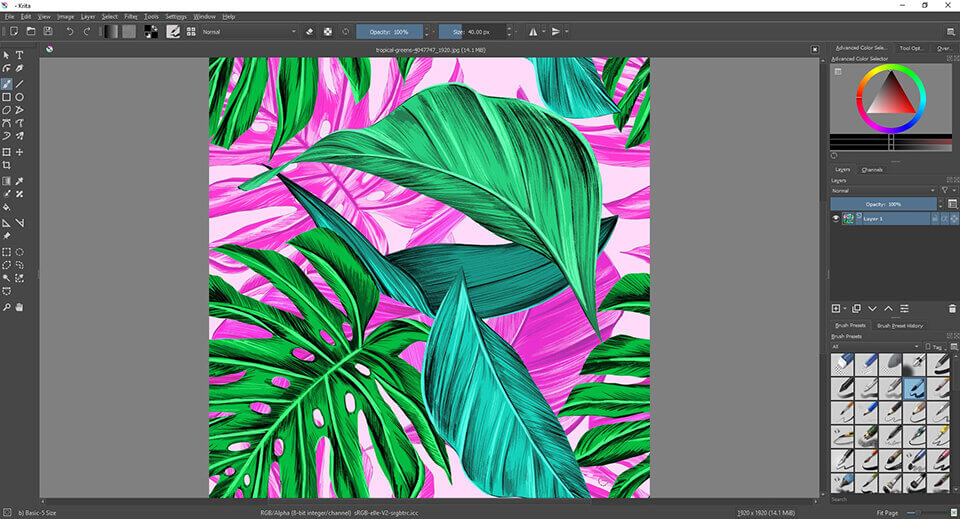
Digital artists need software that provides accurate brushes, layers, color control, and a comfortable drawing workflow. Krita has become one of the most respected free and open-source applications in this category.
For artists who do not want to pay a monthly subscription, Krita offers an impressive alternative.
What Is Krita?
Krita is a free and open-source digital painting application designed primarily for artists.
It is useful for illustrations, concept art, comics, textures, storyboards, and other creative projects.
The current official download page lists Krita 5.3.4, released in September 2026. The application supports Windows, macOS, and Linux.
Main Features
Krita provides a large collection of brushes, layers, blending modes, color tools, stabilizers, selection tools, and animation features.
It is designed around digital painting rather than being a general-purpose photo editor.
This distinction is important.
Someone looking for an application primarily for drawing may find Krita more natural than a traditional photo editor.
Tablet support is another major advantage.
Artists using drawing tablets can take advantage of pressure sensitivity and other tablet capabilities supported by their operating system and hardware.
User Experience
Krita’s interface is designed around creative work.
Users can customize dockers, brush settings, shortcuts, and workspace layouts.
The application may appear complex to beginners, but artists can gradually learn the features they actually need.
The official system requirements list 4 GB of RAM as the minimum and recommend 16 GB for a better experience.
User Review Summary
Artists often appreciate Krita because it feels purpose-built for digital painting.
The brush engine is frequently one of the main attractions.
Another major advantage is the absence of a mandatory subscription.
The main criticism is that users coming from simpler drawing applications may initially find the interface complicated.
Performance can also vary depending on canvas size, layers, brushes, and hardware.
Pros
- Free and open-source
- Excellent digital painting tools
- Strong brush engine
- Drawing tablet support
- Layer-based workflow
- Animation features
- Cross-platform
Cons
- Learning curve
- Large projects require more RAM
- Interface can feel complex
- Not primarily designed as a traditional photo editor
Who Should Use Krita?
Krita is ideal for digital artists, illustrators, comic creators, concept artists, students, and hobbyists.
It is particularly attractive for artists who want professional-style tools without paying for a subscription.
Final Verdict
Krita is one of the strongest examples of how open-source software can compete in creative markets.
It focuses on digital painting and provides artists with an impressive selection of tools.
If drawing and illustration are your main priorities, Krita is absolutely worth testing.
Official Download: Krita Download