Windows provides plenty of built-in functionality, but experienced users often want more control over their desktop.
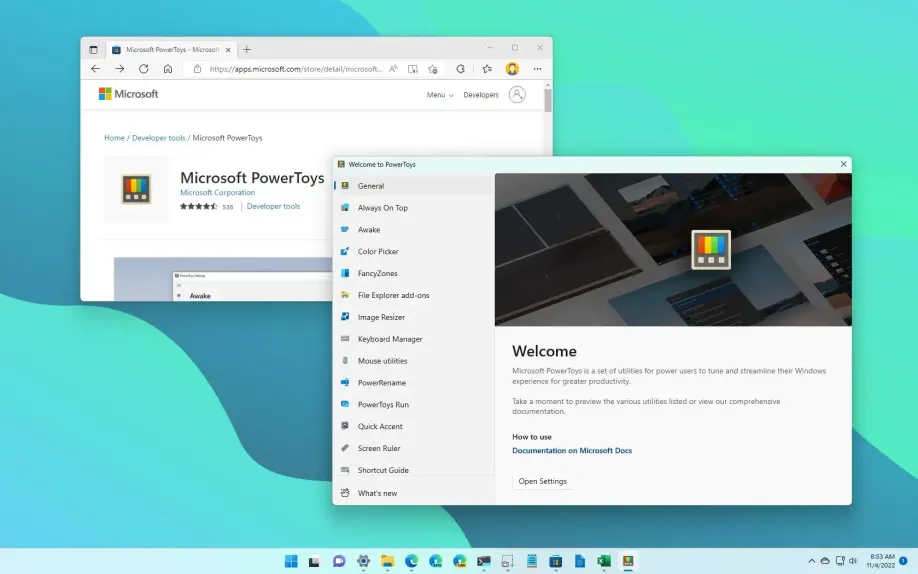
Microsoft PowerToys addresses this need by providing a collection of utilities designed to improve productivity, window management, file handling, keyboard shortcuts, and other everyday tasks.
What Is PowerToys?
PowerToys is a collection of utilities for Windows.
Microsoft provides multiple installation methods, including GitHub, Microsoft Store, and WinGet. The current documentation lists Windows 10 version 2004 or later and Windows 11 as supported operating systems, with x64 and ARM64 processor support.
Instead of being one large application with a single purpose, PowerToys provides many small tools.
Useful PowerToys Features
Depending on the current release, users can access utilities such as PowerToys Run, PowerRename, Text Extractor, Peek, Workspaces, Screen Ruler, and other tools.
PowerToys Run can make launching applications and finding files faster.
PowerRename can make bulk file renaming easier.
Text Extractor can help capture text from parts of the screen.
These small features may seem insignificant individually, but together they can significantly improve a Windows workflow.
User Experience
PowerToys is best suited to users who enjoy customizing their computers.
The application allows users to enable or disable individual utilities.
That is helpful because not everyone needs every tool.
Once configured, many PowerToys utilities can operate quietly in the background.
User Review Summary
Windows power users commonly appreciate PowerToys because it adds useful features without requiring multiple third-party applications.
The fact that Microsoft maintains the project also gives users confidence that it fits naturally into the Windows ecosystem.
The main criticism is that beginners may not immediately understand what every utility does.
The solution is to start with only two or three tools.
Pros
- Free
- Developed by Microsoft
- Many productivity utilities
- Windows integration
- Customizable
- Useful keyboard shortcuts
- Multiple installation methods
Cons
- Windows only
- Large feature collection can be overwhelming
- Some utilities are useful only for specific workflows
- Advanced configuration requires experimentation
Who Should Use PowerToys?
PowerToys is especially useful for developers, office workers, IT professionals, students, and anyone who spends many hours working on Windows.
If you frequently rename files, arrange windows, launch applications, extract text, or use keyboard shortcuts, PowerToys can save time.
Final Verdict
PowerToys is one of those applications that becomes more useful the longer you use it.
Not every tool will be necessary, but finding two or three utilities that fit your workflow can make Windows feel significantly more efficient.
Official Download: Microsoft PowerToys