Introduction
Running a successful retail business requires much more than processing customer payments. Store owners need accurate inventory tracking, detailed sales reporting, employee management, customer insights, and the flexibility to manage multiple locations efficiently. As retail competition continues to increase in 2026, investing in the right point of sale (POS) system has become essential for improving operational efficiency and delivering a better customer experience.
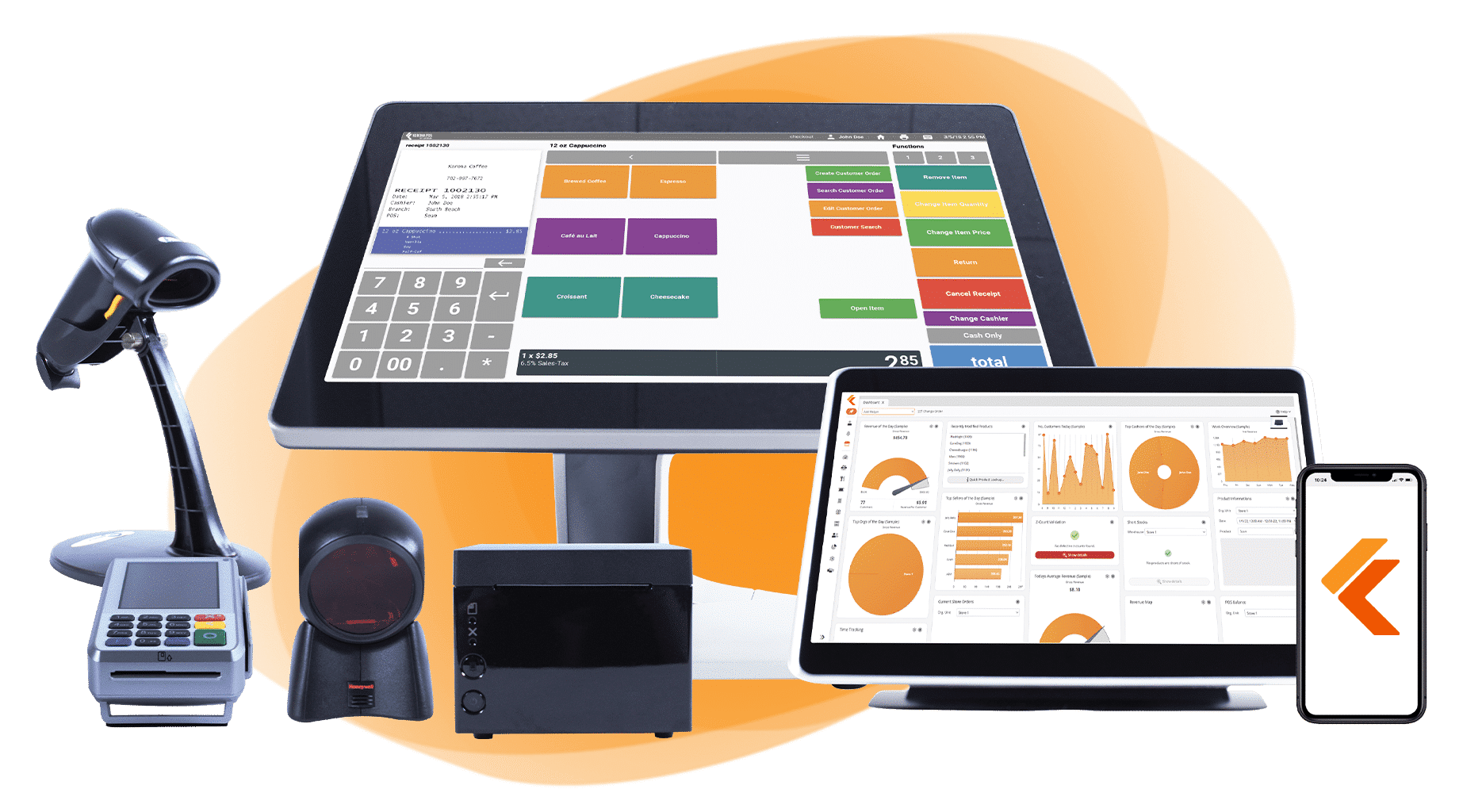
Among the many retail-focused POS solutions available today, KORONA POS has built a strong reputation for its advanced inventory management, customizable reporting, and scalable cloud-based platform. Unlike some entry-level POS systems that primarily focus on payment processing, KORONA POS is designed to help businesses gain deeper insights into their operations while supporting long-term growth.
This review explores KORONA POS in detail, including its key features, pricing, advantages, disadvantages, and whether it remains a worthwhile investment for modern retailers.
What Is KORONA POS?
KORONA POS is a cloud-based point of sale and retail management system developed for businesses that require more than a basic cash register. The platform combines sales processing with inventory management, reporting, customer management, employee monitoring, and business analytics.
It is widely used across several industries, including:
- Retail stores
- Convenience stores
- Gift shops
- Liquor stores
- Museums
- Theme parks
- Ticketing businesses
- Vape shops (where permitted by local regulations)
- Specialty retailers
- Multi-location retail chains
Because the platform operates in the cloud, business owners can access important operational data from virtually anywhere using an internet-connected device.
Key Features
1. Advanced Inventory Management
Inventory management is one of KORONA POS’s strongest capabilities.
Businesses can:
- Track inventory in real time
- Manage thousands of products
- Organize products by category
- Monitor stock movement
- Receive low-stock alerts
- Transfer inventory between locations
- Track product performance
- Generate purchase recommendations
These features help businesses reduce stock shortages while maintaining accurate inventory records.
2. Comprehensive Sales Reporting
One area where KORONA POS truly excels is business reporting.
The platform offers detailed reports covering:
- Daily sales
- Hourly sales
- Weekly performance
- Monthly revenue
- Product profitability
- Employee sales
- Inventory valuation
- Customer purchasing behavior
- Store performance
- Sales trends
Managers can use these insights to identify growth opportunities and make informed business decisions.
3. Customer Management
Building customer loyalty is easier with organized customer data.
KORONA POS allows businesses to:
- Create customer profiles
- Track purchase history
- Monitor buying habits
- Manage loyalty programs through compatible integrations
- Store customer contact information
- Analyze repeat customer behavior
Understanding customer preferences helps businesses improve marketing and retention strategies.
4. Employee Management
Retail operations often involve multiple employees working different shifts.
KORONA POS includes employee management features that allow owners to:
- Create employee accounts
- Assign user permissions
- Monitor employee sales
- Track working hours
- Review staff performance
- Restrict access to sensitive functions
These tools improve accountability while helping managers evaluate team performance.
5. Multi-Location Management
Businesses operating multiple stores can manage all locations from a centralized dashboard.
Multi-location capabilities include:
- Shared inventory
- Centralized product database
- Consolidated reporting
- Location-specific performance tracking
- Inventory transfers
- Consistent pricing management
This functionality simplifies operations for expanding retail businesses.
6. Customer Checkout Experience
KORONA POS supports efficient checkout processes by offering compatibility with multiple payment methods.
Depending on the payment processor and region, businesses may accept:
- Credit cards
- Debit cards
- Contactless payments
- Mobile wallets
- Gift cards
- Split payments
Fast checkout contributes to a smoother customer experience and shorter waiting times.
7. Cloud-Based Accessibility
Since KORONA POS is cloud-based, owners can monitor business performance remotely.
Users can access:
- Sales reports
- Inventory data
- Employee activity
- Customer information
- Business analytics
Remote accessibility provides greater flexibility for business owners managing one or multiple locations.
Ease of Use
KORONA POS features a clean, organized interface designed for daily retail operations.
Employees can quickly learn how to:
- Process transactions
- Search products
- Apply discounts
- Manage returns
- Update inventory
- Access reports
Although the software offers advanced functionality, its logical layout helps minimize the learning curve for new users.
Hardware Compatibility
KORONA POS works with a variety of retail hardware, including:
- Touchscreen POS terminals
- Barcode scanners
- Receipt printers
- Cash drawers
- Customer displays
- Card payment terminals
Businesses can choose compatible hardware that matches their operational requirements.
Integrations
KORONA POS supports integrations with several third-party business applications.
Popular integration categories include:
- Accounting software
- E-commerce platforms
- Payment processors
- Customer loyalty programs
- Marketing tools
- Inventory solutions
- Business analytics software
These integrations allow businesses to expand the platform’s capabilities without replacing existing systems.
Security
Protecting financial transactions and business information is essential.
KORONA POS includes several security features, including:
- Secure cloud infrastructure
- Data encryption
- User permission management
- Automatic backups
- Secure payment processing
- Continuous software updates
These measures help protect business operations while supporting reliable system performance.
Pricing
KORONA POS offers subscription-based pricing designed to accommodate different business sizes.
Costs generally depend on:
- Number of registers
- Business type
- Additional features
- Payment processing arrangements
- Optional integrations
Businesses should evaluate both software and hardware costs when determining the overall investment.
Pros
KORONA POS offers numerous advantages:
- Excellent inventory management
- Detailed business reporting
- Strong multi-location support
- Reliable customer management
- Flexible cloud-based platform
- User-friendly interface
- Comprehensive employee management
- Scalable architecture
- Suitable for specialized retail industries
- Good integration options
Cons
Like any POS platform, KORONA POS has some limitations:
- Businesses with very basic retail needs may not require its advanced feature set.
- Some integrations and optional services may involve additional costs.
- Initial setup may require planning for larger inventory databases.
- Advanced reporting features may take time for new users to fully utilize.
These considerations are common among feature-rich retail management systems.
Best Businesses for KORONA POS
KORONA POS is particularly well suited for:
- Specialty retailers
- Gift shops
- Convenience stores
- Liquor stores
- Museums
- Theme parks
- Ticketing businesses
- Boutique retailers
- Multi-location retail chains
- Growing retail companies
Its inventory and reporting capabilities make it especially valuable for businesses with extensive product catalogs.
Customer Support
KORONA POS provides several customer support resources.
Available support options include:
- Online Help Center
- Knowledge base
- Product documentation
- Email support
- Phone support
- Training resources
- Video tutorials
- Onboarding assistance
These resources help businesses implement and manage the platform more effectively.
Is KORONA POS Worth It in 2026?
KORONA POS remains one of the strongest retail-focused POS solutions available in 2026.
Its advanced inventory management, detailed reporting, cloud accessibility, and support for multi-location businesses make it particularly attractive for retailers seeking greater operational visibility.
While smaller businesses with minimal inventory may find simpler POS systems sufficient, retailers planning long-term growth are likely to benefit from KORONA POS’s comprehensive management capabilities.
KORONA POS vs. Other Retail POS Systems
Compared with platforms such as Square POS, Lightspeed POS, Clover POS, and EPOS Now, KORONA POS places a stronger emphasis on inventory management and business analytics.
Square POS is often chosen for its ease of setup and affordability, while Lightspeed is well known for enterprise-level inventory management. Clover offers flexible hardware options, and EPOS Now provides a balanced solution for both retail and hospitality businesses.
KORONA POS distinguishes itself by delivering highly detailed reporting, flexible inventory controls, and support for specialized retail industries. Businesses that rely heavily on operational data and inventory accuracy may find it particularly well suited to their needs.
Final Verdict
Overall Rating: 4.8/5
Pros
- Advanced inventory management
- Outstanding reporting and analytics
- Excellent multi-location capabilities
- Cloud-based remote access
- Strong employee management
- Reliable customer tracking
- Flexible hardware compatibility
- Suitable for growing retail businesses
Cons
- Advanced features may exceed the needs of very small retailers
- Some optional integrations involve additional costs
- Initial setup can be more involved for large inventories
- Reporting tools may require some learning for new users
Conclusion
KORONA POS continues to be one of the leading retail management platforms in 2026 for businesses seeking more than a basic point of sale system. Its combination of advanced inventory management, comprehensive reporting, cloud accessibility, and scalable architecture makes it an excellent choice for retailers looking to improve operational efficiency and support future growth. Whether operating a single specialty store or managing multiple retail locations, KORONA POS provides the tools necessary to make informed business decisions and deliver a smooth customer experience.