Introduction
Modern businesses face increasingly complex challenges when managing finances, operations, inventory, sales, customer relationships, and supply chains. As companies grow, relying on separate applications for each department can create disconnected data, inefficient workflows, and difficulty making accurate business decisions.
Enterprise Resource Planning (ERP) software provides a solution by bringing multiple business functions together into one integrated platform. Among the most recognized ERP solutions available today, Microsoft Dynamics 365 Business Central stands out as a powerful cloud-based platform designed for small and medium-sized enterprises (SMEs) and growing organizations.
Microsoft Dynamics 365 Business Central combines accounting, financial management, inventory, sales, purchasing, project management, supply chain operations, and reporting tools into a single business management system. Built within the Microsoft ecosystem, it offers deep integration with popular tools such as Microsoft 365, Excel, Teams, Power BI, and other business applications.
In this comprehensive review, we will explore Microsoft Dynamics 365 Business Central’s features, pricing, advantages, disadvantages, and determine whether this all-in-one ERP and accounting platform is worth the investment in 2026.
What Is Microsoft Dynamics 365 Business Central?
Microsoft Dynamics 365 Business Central is a cloud-based enterprise resource planning (ERP) solution designed to help businesses manage their financial and operational activities from one centralized platform.
It is the successor to Microsoft’s long-running Dynamics NAV product and is designed specifically for organizations that need more advanced capabilities than traditional accounting software but do not require the complexity of large enterprise ERP systems.
Business Central helps companies manage:
- Financial accounting
- Sales and customer management
- Purchasing
- Inventory
- Supply chain operations
- Project management
- Manufacturing
- Reporting and analytics
The platform is used by businesses worldwide across industries such as:
- Manufacturing
- Retail
- Wholesale
- Distribution
- Professional services
- Technology companies
- Healthcare
- E-commerce
Key Features
1. Complete Financial Management
Financial management is one of the strongest components of Microsoft Dynamics 365 Business Central.
The platform provides tools for:
- General ledger management
- Accounts payable
- Accounts receivable
- Bank reconciliation
- Fixed assets
- Budget management
- Cash flow forecasting
- Multi-currency accounting
- Financial consolidation
These features help businesses maintain accurate financial records while gaining better control over their financial performance.
2. Advanced Accounting and Reporting
Business Central provides detailed financial reports that help companies analyze performance.
Users can access reports including:
- Profit and Loss statements
- Balance sheets
- Cash flow statements
- Budget comparisons
- Sales analysis
- Expense reports
- Financial forecasts
- Department performance reports
Integration with Microsoft Power BI enables businesses to create advanced dashboards and visualize important business data.
3. Inventory Management
Effective inventory management is essential for businesses that sell or manufacture products.
Microsoft Dynamics 365 Business Central offers features such as:
- Real-time inventory tracking
- Item management
- Warehouse operations
- Stock movement monitoring
- Inventory forecasting
- Product costing
- Multiple warehouse support
These capabilities help businesses reduce inventory costs and improve supply chain efficiency.
4. Sales and Customer Relationship Management
Business Central connects sales activities with financial and operational data.
Companies can manage:
- Customer information
- Sales quotes
- Sales orders
- Customer invoices
- Sales opportunities
- Customer history
- Service interactions
Having customer and financial data in one system allows businesses to provide better service and improve sales performance.
5. Purchasing Management
Managing suppliers and purchasing processes becomes easier with Business Central.
The platform supports:
- Vendor management
- Purchase orders
- Purchase invoices
- Supplier analysis
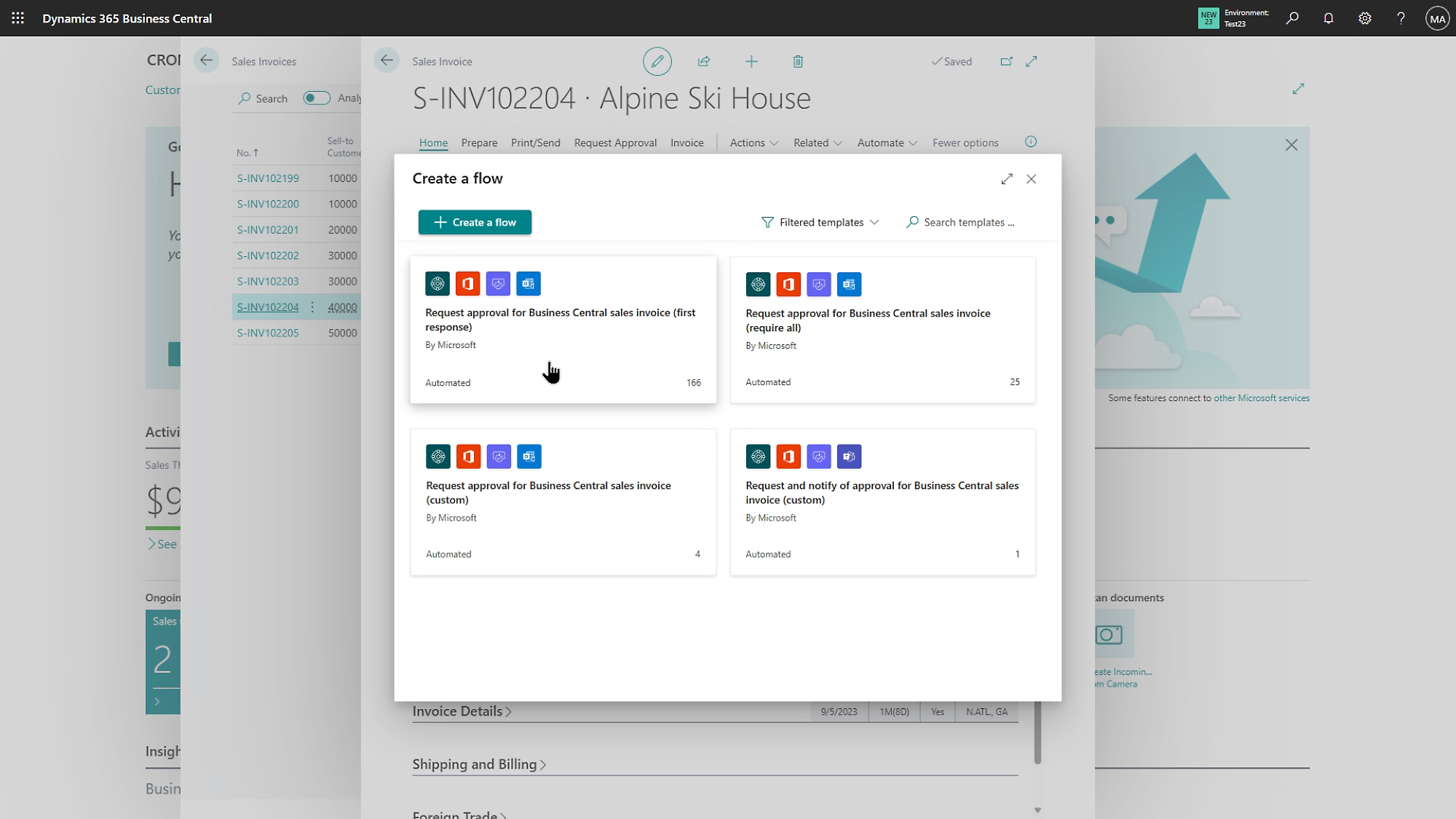
- Approval workflows
- Procurement tracking
These features help businesses optimize purchasing decisions and maintain better supplier relationships.
6. Supply Chain Management
For businesses with complex operations, Business Central provides valuable supply chain capabilities.
Features include:
- Demand planning
- Inventory optimization
- Warehouse management
- Order fulfillment
- Product availability tracking
- Supply forecasting
These tools help organizations improve operational efficiency and respond faster to market changes.
7. Project Management
Businesses providing professional services can benefit from Business Central’s project management features.
Users can manage:
- Project budgets
- Resources
- Time tracking
- Project expenses
- Project billing
- Profitability analysis
This makes it suitable for consulting companies, agencies, and service-based organizations.
Microsoft Ecosystem Integration
One of the biggest advantages of Microsoft Dynamics 365 Business Central is its integration with the Microsoft ecosystem.
The platform works seamlessly with:
- Microsoft Excel
- Microsoft Teams
- Microsoft Outlook
- Power BI
- Power Automate
- Microsoft 365
This integration allows businesses to improve collaboration, automate workflows, and analyze data more effectively.
Ease of Use
Microsoft Dynamics 365 Business Central offers a professional interface designed for business users.
The platform includes:
- Custom dashboards
- Personalized workspaces
- Role-based views
- Search tools
- Workflow automation
- Business insights
Users familiar with Microsoft products often find the interface easier to understand compared with other ERP systems.
However, because Business Central is a comprehensive ERP platform, proper implementation and training are usually recommended.
Automation Features
Automation is one of the key benefits of Business Central.
Businesses can automate:
- Invoice processing
- Approval workflows
- Financial reporting
- Payment reminders
- Inventory updates
- Purchase processes
- Data entry tasks
Automation improves productivity by reducing repetitive manual activities and minimizing errors.
Cloud Deployment Benefits
As a cloud-based ERP solution, Business Central provides several advantages:
- Access from anywhere
- Automatic software updates
- Reduced infrastructure costs
- Better collaboration
- Scalability
- Improved data accessibility
Companies can focus on their operations without managing complex server environments.
Security
Business data security is a major priority for organizations using ERP software.
Microsoft Dynamics 365 Business Central benefits from Microsoft’s cloud security infrastructure, including:
- Data encryption
- Identity management
- Role-based access control
- Multi-factor authentication
- Compliance standards
- Regular security updates
These protections help businesses maintain secure financial and operational data.
Integration and Customization
Business Central offers extensive customization options.
Businesses can extend functionality through:
- Microsoft AppSource applications
- Industry-specific extensions
- Custom workflows
- Third-party integrations
- Developer customization
This flexibility allows companies to adapt the system to their unique business requirements.
Pricing
Microsoft Dynamics 365 Business Central pricing depends on several factors, including:
- Number of users
- License type
- Required features
- Implementation services
- Customizations
- Partner support
Common licensing options include different user plans designed for businesses with various operational needs.
While Business Central requires a higher investment than basic accounting software, many organizations consider it a long-term technology investment because of its scalability and extensive capabilities.
Pros
Microsoft Dynamics 365 Business Central offers many advantages:
- Complete ERP and accounting solution
- Strong Microsoft ecosystem integration
- Powerful financial management
- Advanced reporting capabilities
- Excellent inventory features
- Cloud-based accessibility
- Scalable for growing businesses
- Strong security infrastructure
- Extensive customization options
- Suitable for multiple industries
Cons
Despite its strengths, Business Central has some limitations:
- Implementation can require professional assistance.
- Licensing costs may be higher than simple accounting software.
- Users may need training to understand advanced features.
- Small businesses with basic accounting needs may find it too complex.
- Customization can increase project costs.
These factors should be evaluated before choosing an ERP platform.
Best Businesses for Microsoft Dynamics 365 Business Central
Business Central is particularly suitable for:
- Growing SMEs
- Manufacturing companies
- Retail businesses
- Wholesale distributors
- Professional service companies
- International organizations
- Companies replacing outdated accounting systems
- Businesses requiring integrated operations
Organizations looking for a scalable ERP solution within the Microsoft ecosystem will benefit the most.
Customer Support
Microsoft provides various support options for Dynamics 365 Business Central users.
Available resources include:
- Microsoft documentation
- Community forums
- Training materials
- Partner networks
- Technical support
- Implementation consultants
- Online learning resources
Because ERP systems affect many areas of a business, professional implementation support can help ensure successful adoption.
Is Microsoft Dynamics 365 Business Central Worth It in 2026?
Microsoft Dynamics 365 Business Central remains one of the most competitive ERP and accounting platforms for growing businesses in 2026.
Its combination of financial management, inventory control, sales integration, reporting, automation, and Microsoft ecosystem connectivity makes it a strong choice for organizations seeking a centralized business management solution.
However, businesses should consider their operational complexity before investing. Small companies with simple bookkeeping requirements may find solutions such as QuickBooks Online, Xero, or Zoho Books more suitable.
For organizations that need a scalable ERP platform with advanced capabilities and future growth potential, Business Central offers significant value.
Microsoft Dynamics 365 Business Central vs. Other ERP Solutions
Compared with ERP platforms such as SAP Business One, Oracle NetSuite ERP, and accounting solutions like QuickBooks Online and Xero, Microsoft Dynamics 365 Business Central focuses on providing enterprise-level capabilities with accessibility for growing businesses.
SAP Business One is popular among SMEs requiring integrated ERP functionality, while Oracle NetSuite is widely used by organizations needing advanced cloud ERP capabilities.
Business Central differentiates itself through its deep Microsoft integration, flexible customization options, strong reporting tools, and user-friendly environment for businesses already using Microsoft products.
Final Verdict
Overall Rating: 4.8/5
Pros
- Complete ERP and accounting platform
- Excellent Microsoft ecosystem integration
- Powerful financial management tools
- Advanced inventory and supply chain features
- Strong reporting and analytics
- Cloud-based accessibility
- Highly scalable solution
- Strong security and compliance features
Cons
- Higher cost compared with basic accounting software
- Requires implementation planning
- Learning curve for advanced features
- May be too complex for very small businesses
Conclusion
Microsoft Dynamics 365 Business Central is one of the most capable all-in-one ERP and accounting platforms available in 2026. Its combination of financial management, inventory control, supply chain tools, CRM capabilities, automation, and Microsoft ecosystem integration makes it an excellent solution for growing businesses seeking a centralized management platform.
Although the investment and implementation process may be more demanding than traditional accounting software, Business Central provides long-term value for organizations that need scalability, operational efficiency, and better business visibility. For companies ready to move beyond basic accounting tools and adopt a complete ERP solution, Microsoft Dynamics 365 Business Central is a reliable and future-ready choice.