Introduction
For many entrepreneurs, freelancers, and small business owners, managing finances is one of the most challenging aspects of running a business. Recording income, tracking expenses, sending invoices, and preparing financial reports are essential tasks, but investing in expensive accounting software isn’t always practical—especially for startups operating on limited budgets.
This is where Wave Accounting has earned a strong reputation. Unlike many accounting platforms that require monthly subscriptions, Wave offers a free cloud-based accounting solution with a range of essential bookkeeping features. Over the years, it has become a popular choice among freelancers, sole proprietors, and small businesses looking for an affordable way to manage their finances.
But can free accounting software truly meet the needs of a growing business? In this comprehensive review, we’ll explore Wave Accounting’s features, pricing, advantages, disadvantages, and whether it remains a smart choice for small businesses in 2026.
What Is Wave Accounting?
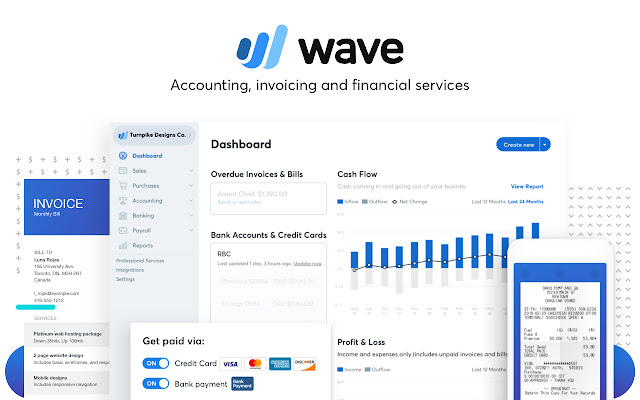
Wave Accounting is a cloud-based accounting platform designed primarily for freelancers, independent professionals, startups, and small businesses. The software focuses on simplifying bookkeeping by offering essential accounting tools through an intuitive online interface.
Users can manage:
- Income and expenses
- Invoices
- Financial reports
- Bank reconciliation
- Receipt scanning
- Customer information
- Vendor records
Because Wave is cloud-based, users can securely access their financial data from virtually anywhere using a web browser or compatible mobile application.
One of Wave’s biggest selling points is that its core accounting features are available at no cost, making it an attractive option for businesses that want to reduce operating expenses.
Key Features
1. Free Cloud Accounting
Wave’s core accounting platform includes many features that businesses typically expect from paid bookkeeping software.
Users can:
- Record financial transactions
- Organize accounts
- Track income
- Monitor expenses
- Create journal entries
- Generate financial reports
For businesses with straightforward accounting needs, these tools provide a solid foundation without requiring a monthly subscription.
2. Professional Invoicing
Creating invoices is simple with Wave.
Businesses can:
- Design professional invoices
- Customize invoices with company branding
- Send invoices by email
- Track invoice status
- Set payment reminders
- Schedule recurring invoices
The invoicing tools help improve cash flow while presenting a professional image to customers.
3. Expense Tracking
Accurate expense management is essential for understanding business profitability.
Wave allows users to:
- Record business expenses
- Categorize transactions
- Upload receipts
- Connect bank accounts
- Monitor spending trends
Keeping expenses organized also makes tax preparation much easier.
4. Bank Connections and Reconciliation
Wave supports secure bank connections that automatically import transactions from compatible financial institutions.
Users can:
- Match imported transactions
- Categorize expenses
- Reconcile bank accounts
- Review account balances
- Detect missing transactions
Automation helps reduce manual bookkeeping while improving accuracy.
5. Financial Reporting
Wave includes several useful financial reports that help business owners monitor financial performance.
Available reports include:
- Profit and Loss Statement
- Balance Sheet
- Cash Flow Report
- Sales Tax Report
- Customer Income Report
- Expense Report
- Account Balances
These reports provide valuable insights without requiring advanced accounting knowledge.
6. Receipt Management
Wave allows users to store digital copies of business receipts.
Users can:
- Upload receipt images
- Organize expenses
- Attach receipts to transactions
- Maintain records for future reference
Digital receipt storage simplifies recordkeeping and supports more accurate bookkeeping.
7. Mobile Accessibility
Wave provides mobile applications that allow users to:
- Create invoices
- Accept payments (where available)
- Scan receipts
- Monitor business activity
- View customer information
This flexibility helps business owners manage finances while working remotely.
Ease of Use
One of Wave’s strongest advantages is its user-friendly interface.
The dashboard is clean and straightforward, making it easy for users to:
- Record transactions
- Create invoices
- Review reports
- Track expenses
- Monitor cash flow
Even individuals with limited accounting experience can usually become comfortable with the platform after a short learning period.
Automation Features
Wave includes several automation tools that reduce repetitive bookkeeping work.
Automation features include:
- Bank transaction imports
- Expense categorization
- Invoice reminders
- Recurring invoices
- Financial report generation
Although its automation capabilities may not be as extensive as those found in enterprise accounting software, they are sufficient for many small businesses.
Integrations
Wave offers integrations with various business tools and payment services.
Businesses can connect Wave with:
- Online payment solutions
- Payroll services (availability varies by region)
- Banking services
- Receipt management tools
- Selected business applications
While its integration ecosystem is smaller than some larger accounting platforms, it covers many common business requirements.
Security
Wave uses several security measures to help protect financial information.
Security features include:
- Secure cloud infrastructure
- Data encryption
- Automatic backups
- Multi-factor authentication
- Secure login systems
- Continuous software updates
These protections help safeguard business data while maintaining reliable platform performance.
Pricing
Wave’s pricing model is one of its biggest advantages.
The core accounting, invoicing, and bookkeeping features are available free of charge.
Additional paid services may include:
- Online payment processing
- Payroll (in supported regions)
- Premium financial services
- Selected business tools
This flexible approach allows businesses to pay only for the services they actually need.
Pros
Wave Accounting offers many benefits:
- Free core accounting software
- Easy-to-use interface
- Professional invoicing tools
- Reliable expense tracking
- Useful financial reports
- Secure cloud-based platform
- Mobile accessibility
- Automatic bank transaction imports
- Ideal for startups and freelancers
- Excellent value for budget-conscious businesses
Cons
Despite its advantages, Wave has some limitations:
- Advanced accounting features are more limited than those offered by enterprise accounting platforms.
- Inventory management capabilities are basic.
- Some services are available only in specific countries or regions.
- Businesses with complex financial requirements may eventually outgrow the platform.
These limitations are understandable considering that the core accounting software is available at no cost.
Best Businesses for Wave Accounting
Wave is particularly well suited for:
- Freelancers
- Consultants
- Self-employed professionals
- Startups
- Small businesses
- Creative agencies
- Marketing consultants
- Independent contractors
- Home-based businesses
- Service providers
Businesses with relatively simple bookkeeping needs will benefit the most from Wave’s straightforward feature set.
Customer Support
Wave offers several support resources for users.
Available resources include:
- Help Center
- Knowledge base
- Community resources
- Product guides
- Tutorials
- Email support for certain services
- Self-service documentation
Because many features are free, users may rely more heavily on the available online documentation for troubleshooting and learning.
Is Wave Accounting Worth It in 2026?
Wave Accounting remains one of the best free accounting solutions for freelancers and small businesses in 2026.
Its combination of bookkeeping, invoicing, expense tracking, financial reporting, and cloud accessibility provides excellent value for businesses with straightforward accounting needs.
While companies with multiple entities, advanced inventory management, or complex financial reporting requirements may eventually require more comprehensive software, Wave offers an outstanding starting point for entrepreneurs who want professional accounting tools without recurring subscription costs.
Wave Accounting vs. Paid Accounting Software
When comparing Wave with subscription-based accounting platforms such as QuickBooks Online, Xero, or Zoho Books, it’s important to consider your business’s size and complexity.
Wave is an excellent choice for businesses seeking essential accounting functionality with minimal costs. It performs well for invoicing, tracking expenses, and generating standard financial reports.
However, paid accounting solutions generally provide more advanced capabilities, including:
- Extensive workflow automation
- Advanced inventory management
- Multi-entity accounting
- Industry-specific reporting
- Broader third-party integrations
- Enhanced collaboration features
- More scalable financial management tools
As a result, businesses experiencing rapid growth may eventually benefit from upgrading to a more feature-rich accounting platform.
Final Verdict
Overall Rating: 4.7/5
Pros
- Completely free core accounting software
- Clean and intuitive interface
- Professional invoicing capabilities
- Reliable expense and income tracking
- Helpful financial reporting
- Cloud-based accessibility
- Great choice for freelancers and startups
- Excellent overall value
Cons
- Limited advanced accounting features
- Basic inventory management
- Some services are region-specific
- May not meet the needs of larger or rapidly growing businesses
Conclusion
Wave Accounting continues to be one of the most impressive free accounting software solutions available in 2026. Its combination of cloud-based bookkeeping, professional invoicing, expense management, and financial reporting makes it an ideal option for freelancers, startups, and small businesses seeking an affordable way to manage their finances. While it may not replace enterprise accounting systems for larger organizations, Wave delivers remarkable value for entrepreneurs who need reliable accounting tools without the burden of monthly subscription fees.