Modern work depends heavily on software. Whether I am writing documents, organizing projects, managing files, communicating with others, or researching information, there always seems to be another desktop application promising to make the process faster and easier.
Recently, I decided to test several newer types of desktop applications designed for work. Rather than focusing only on feature lists, I wanted to see what happened when these tools became part of an actual daily workflow.
The experience was interesting. Some applications genuinely saved time, some created unexpected problems, and a few surprised me by being useful in ways I had not anticipated.
My First Mistake Was Testing Too Much
When I started, I made a common mistake: I wanted to try everything.
Modern desktop software offers applications for almost every aspect of professional life. There are task managers, AI assistants, note-taking tools, communication platforms, automation applications, document editors, and productivity dashboards.
At first, having so many choices seemed exciting.
After a few days, however, I noticed that constantly switching between applications was becoming a distraction. I was spending time learning software instead of actually working.
That was my first lesson: more applications do not automatically create more productivity.
AI Assistants Were the Biggest Surprise
The most interesting tools I tested were AI-powered desktop applications.
I initially expected AI assistants to be useful mainly for writing and answering questions. In practice, I found that their greatest value was helping me overcome the starting point of a task.
When I had a rough idea but did not know how to organize it, an AI assistant could suggest an outline. When I had a long piece of information to review, it could help summarize the main points.
The output was not always perfect, but it gave me something to work with.
That reduced the amount of time I spent staring at an empty document.
Task Management Worked, but Simplicity Mattered
I also tested modern task management applications.
The better ones made it easy to create tasks, set deadlines, establish priorities, and organize projects. Having a visual overview of unfinished work was particularly useful when several projects were active at the same time.
However, I quickly discovered that task management software can become too complicated.
I experimented with multiple labels, categories, tags, priorities, and custom fields. Eventually, the system became harder to maintain than a simple checklist.
I removed most of the unnecessary settings.
Once simplified, the application became much more useful.
Modern Note-Taking Changed How I Store Information
Another area that surprised me was note-taking.
Traditional notes often become collections of disconnected documents. I might remember writing something several weeks ago but have no idea where I saved it.
Newer note-taking applications increasingly focus on search, organization, linking, and AI-assisted retrieval.
I found this particularly useful for research and long-term projects.
Instead of treating notes as temporary information, I started thinking of them as a personal knowledge base.
The ability to quickly find an old idea was sometimes more valuable than the ability to create a new one.
Automation Worked Best for Boring Tasks
Automation was another feature I wanted to test.
I focused on repetitive activities such as notifications, organizing information, moving data between applications, and creating routine reminders.
The results were positive.
Once an automation worked correctly, it could quietly handle a repetitive process without requiring my attention.
However, I learned not to automate everything.
Complicated workflows were sometimes difficult to troubleshoot. If an automation failed, finding the cause could take longer than completing the original task manually.
For me, automation worked best when the process was predictable and repeated frequently.
Some Productivity Apps Actually Added Distractions
Not every application improved my workflow.
Some desktop tools had too many notifications. Others constantly suggested features, reminders, recommendations, or AI-generated actions.
Individually, these features seemed useful. Together, they became distracting.
I eventually turned off most notifications that were not essential.
This was an unexpected lesson: productivity software should protect attention, not compete for it.
Compatibility Was More Important Than Expected
Another issue I encountered was compatibility.
A desktop application might work beautifully on its own but become less useful when it does not integrate well with the other software I already use.
Moving information manually between applications quickly became frustrating.
The most useful tools were those that fit naturally into my existing workflow.
This made me realize that choosing software should involve looking at the entire digital environment, not just evaluating one application in isolation.
Privacy Became a Bigger Consideration
AI-powered software also made me think more carefully about privacy.
Some applications can work with documents, files, screen content, or other information available on a computer.
That can be extremely convenient, but it also means users need to understand what information they are allowing software to access.
I became more selective about which tools received access to important files.
Convenience is valuable, but it should not come at the expense of responsible data management.
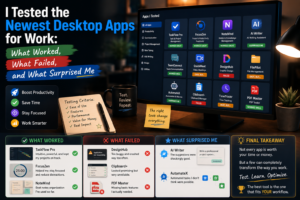
What Failed?
The applications that failed for me were not necessarily poorly designed.
Most simply did not fit my needs.
Some had too many features. Others required too much setup. A few offered solutions to problems I rarely encountered.
This reinforced an important principle: software should be evaluated according to the user’s workflow, not just its marketing claims.
A highly rated application can still be the wrong choice if it makes your specific work more complicated.
What Actually Worked?
After testing different desktop applications, several features stood out.
AI assistance helped me start tasks faster. Task management improved organization. Modern note-taking made information easier to retrieve. Automation reduced repetitive work.
But the biggest improvement came from combining these tools carefully rather than using all of them simultaneously.
A simple workflow with a few well-integrated applications worked much better than a complicated collection of software.
Final Thoughts
Testing newer desktop applications changed the way I think about productivity software.
The most impressive tools were not always the ones with the longest feature lists. The winners were the applications that quietly removed friction from everyday work.
Some tools saved time. Others taught me what not to use.
Most importantly, I learned that productivity is not about having the newest software on your computer. It is about choosing tools that help you accomplish meaningful work with less effort and fewer distractions.
The best desktop application is ultimately not the one that does everything.
It is the one that does something you genuinely need—and does it well.