Introduction
Effective financial management is essential for every successful business. From tracking daily expenses and managing invoices to monitoring cash flow and preparing financial reports, business owners need reliable accounting software that simplifies these tasks without sacrificing accuracy.
Cloud accounting platforms have become increasingly popular because they provide real-time access to financial data, support collaboration with accountants, and automate many routine bookkeeping processes. Among the leading cloud accounting solutions available today, Xero Accounting has earned a strong reputation for its intuitive design, powerful automation features, and extensive integration ecosystem.
Originally developed for small businesses, Xero has grown into a globally recognized accounting platform used by entrepreneurs, freelancers, retailers, agencies, and medium-sized companies across many industries.
In this review, we’ll examine Xero Accounting’s features, pricing, advantages, disadvantages, and determine whether it remains one of the best cloud-based accounting solutions for small and medium businesses in 2026.
What Is Xero Accounting?
Xero Accounting is a cloud-based financial management platform that helps businesses organize their accounting, bookkeeping, invoicing, expense tracking, and financial reporting from a single online dashboard.
Unlike traditional desktop accounting software, Xero stores data securely in the cloud, allowing business owners, accountants, and authorized team members to access financial information from virtually anywhere using computers, tablets, or smartphones.
The platform is designed to reduce manual bookkeeping while providing better visibility into a company’s financial health.
Key Features
1. Professional Invoicing
Creating and managing invoices is one of Xero’s core strengths.
Businesses can:
- Design professional invoices
- Add company branding
- Send invoices electronically
- Schedule recurring invoices
- Track payment status
- Set automatic payment reminders
- Accept online payments through supported payment providers
These tools help businesses improve cash flow by encouraging faster customer payments.
2. Bank Reconciliation
Bank reconciliation can be one of the most time-consuming accounting tasks.
Xero simplifies the process by allowing users to:
- Connect business bank accounts
- Import transactions automatically
- Match payments with invoices
- Categorize transactions
- Identify discrepancies
- Complete reconciliations efficiently
Automation reduces manual data entry and helps maintain accurate financial records.
3. Expense Management
Monitoring expenses is critical for understanding business profitability.
Xero enables businesses to:
- Record expenses
- Upload receipts
- Categorize spending
- Track reimbursements
- Monitor recurring expenses
- Review spending trends
These features help owners maintain better control over operational costs.
4. Financial Reporting
Xero includes a wide variety of financial reports that support informed decision-making.
Available reports include:
- Profit and Loss Statement
- Balance Sheet
- Cash Flow Statement
- Accounts Receivable
- Accounts Payable
- Budget Reports
- Tax Reports
- Sales Reports
- Expense Analysis
Reports can often be customized to meet different business and accounting requirements.
5. Cash Flow Management
Healthy cash flow is essential for business sustainability.
Xero provides tools that help businesses:
- Monitor available cash
- Track unpaid invoices
- Review outstanding bills
- Forecast future cash flow
- Analyze payment trends
Having real-time financial information enables businesses to respond more quickly to changing conditions.
6. Multi-Currency Support
Businesses serving international customers may benefit from Xero’s multi-currency capabilities (available on eligible plans).
Supported features include:
- Foreign currency transactions
- Currency conversion
- International invoicing
- Exchange rate updates
- Multi-currency reporting
These tools simplify accounting for companies operating across different markets.
7. Project Tracking
Some Xero plans include project management features that help service-based businesses:
- Track project income
- Record project expenses
- Monitor profitability
- Manage project budgets
- Generate project reports
This functionality is especially useful for consultants, agencies, contractors, and freelancers.
Ease of Use
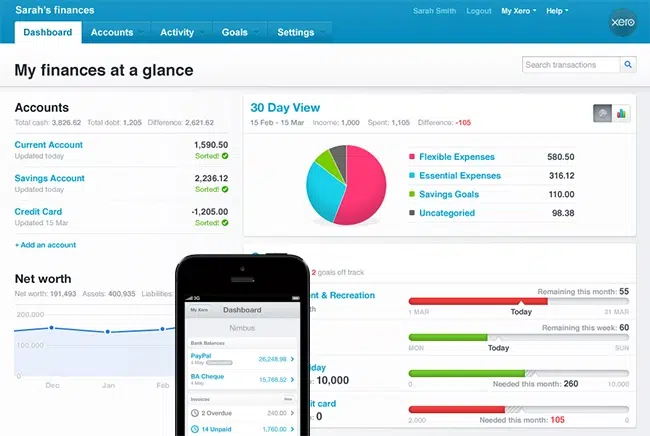
One of Xero’s greatest strengths is its clean and modern interface.
The dashboard presents financial information in an organized manner, making it easier for users to:
- View bank balances
- Review outstanding invoices
- Record transactions
- Generate reports
- Monitor business performance
Even users with limited accounting experience often find the platform approachable after a short learning period.
Automation Features
Automation plays a significant role in reducing bookkeeping workload.
Xero includes automation for:
- Bank transaction imports
- Invoice reminders
- Recurring invoices
- Expense categorization
- Financial report generation
- Payment matching
These tools save time while reducing the likelihood of manual errors.
Mobile Accessibility
Xero offers mobile applications that allow users to:
- Create invoices
- Record expenses
- Upload receipts
- View financial reports
- Monitor cash flow
- Approve bills
This flexibility enables business owners to stay connected to their finances while traveling or working remotely.
Integrations
One of Xero’s strongest advantages is its large integration marketplace.
Businesses can connect Xero with applications for:
- Customer relationship management (CRM)
- Payroll
- Inventory management
- E-commerce
- Time tracking
- Payment gateways
- Expense management
- Business analytics
These integrations help businesses create efficient workflows tailored to their operations.
Security
Financial information requires a high level of protection.
Xero includes several security measures, including:
- Secure cloud infrastructure
- Data encryption
- Multi-factor authentication
- Automatic backups
- User access controls
- Continuous software updates
These protections help maintain data integrity while supporting secure collaboration.
Pricing
Xero offers multiple subscription plans designed for businesses at different stages of growth.
Pricing generally depends on:
- Number of accounting features
- Multi-currency support
- Project management tools
- Business size
- Transaction volume
Although subscription costs increase with additional functionality, many businesses appreciate the scalability provided by the platform.
Pros
Xero Accounting offers numerous benefits:
- Clean and user-friendly interface
- Excellent cloud accessibility
- Powerful bank reconciliation
- Professional invoicing tools
- Strong financial reporting
- Multi-user collaboration
- Extensive third-party integrations
- Mobile applications
- Scalable subscription options
- Suitable for international businesses
Cons
Like any accounting software, Xero has some limitations:
- Some advanced features are available only on higher-tier plans.
- Payroll functionality may depend on region or third-party integrations.
- Businesses requiring complex enterprise accounting may need more specialized ERP software.
- Certain integrations involve additional subscription costs.
These considerations should be evaluated based on each company’s operational needs.
Best Businesses for Xero Accounting
Xero is well suited for:
- Small businesses
- Medium-sized businesses
- Freelancers
- Consultants
- Marketing agencies
- Retail stores
- E-commerce businesses
- Contractors
- Professional service firms
- Creative agencies
- International businesses
- Growing startups
Its flexible feature set supports a wide range of industries.
Customer Support
Xero offers several support resources to assist users.
Support options include:
- Online Help Center
- Knowledge base
- Community forums
- Email support
- Educational articles
- Product guides
- Video tutorials
- Certified advisor network
These resources make it easier for users to learn the software and resolve common questions.
Is Xero Accounting Worth It in 2026?
Xero continues to be one of the most capable cloud accounting solutions for small and medium-sized businesses.
Its combination of automated bookkeeping, real-time financial visibility, intuitive design, and broad integration ecosystem makes it an excellent choice for organizations looking to modernize their accounting processes.
While businesses should compare subscription plans carefully to ensure they receive the features they need, Xero offers outstanding value for companies seeking flexible, cloud-based financial management.
Final Verdict
Overall Rating: 4.8/5
Pros
- Modern and intuitive interface
- Excellent bank reconciliation automation
- Strong invoicing capabilities
- Comprehensive financial reporting
- Secure cloud-based platform
- Extensive integration marketplace
- Mobile access from virtually anywhere
- Suitable for growing businesses
Cons
- Advanced tools require higher subscription plans
- Some features vary by country or integration availability
- Enterprise organizations may require more advanced financial systems
Conclusion
Xero Accounting remains one of the leading cloud-based accounting platforms for small and medium businesses in 2026. Its focus on automation, ease of use, secure cloud access, and detailed financial reporting helps business owners spend less time on bookkeeping and more time growing their companies. Whether you’re a freelancer, retailer, consultant, or expanding business, Xero offers a reliable and scalable accounting solution that can adapt to your financial management needs as your business evolves.